
AI Application Development from Prototype to Production

You've got the prototype. The demo looked sharp, the answers were coherent, and everybody in the room could see the feature working. Then the hard questions started, about what happens when users try to break it, when traffic rises, when retrieval goes stale, and when the bill doesn't match the slide deck.
That's the shape of AI application development today, and the rules that govern it have not changed as fast as the models have. The work isn't getting a model to say the right thing once, it's turning a clever prototype into a feature that survives bad inputs, partial outages, changing workflows, and real cost pressure. The teams that win treat the model as one moving part inside a governed system, not as the product itself.
Table of Contents
- The Gap Between AI Demos and Production Features
- Designing an AI Application Around Reliability
- Prototyping the Model and Retrieval Layer
- Building Evaluation Pipelines That Catch Real Failures
- Deploying AI Features With Guardrails and Fallbacks
- Monitoring AI Applications Under Real Traffic
- Habits That Keep AI Features Alive in Production
The Gap Between AI Demos and Production Features
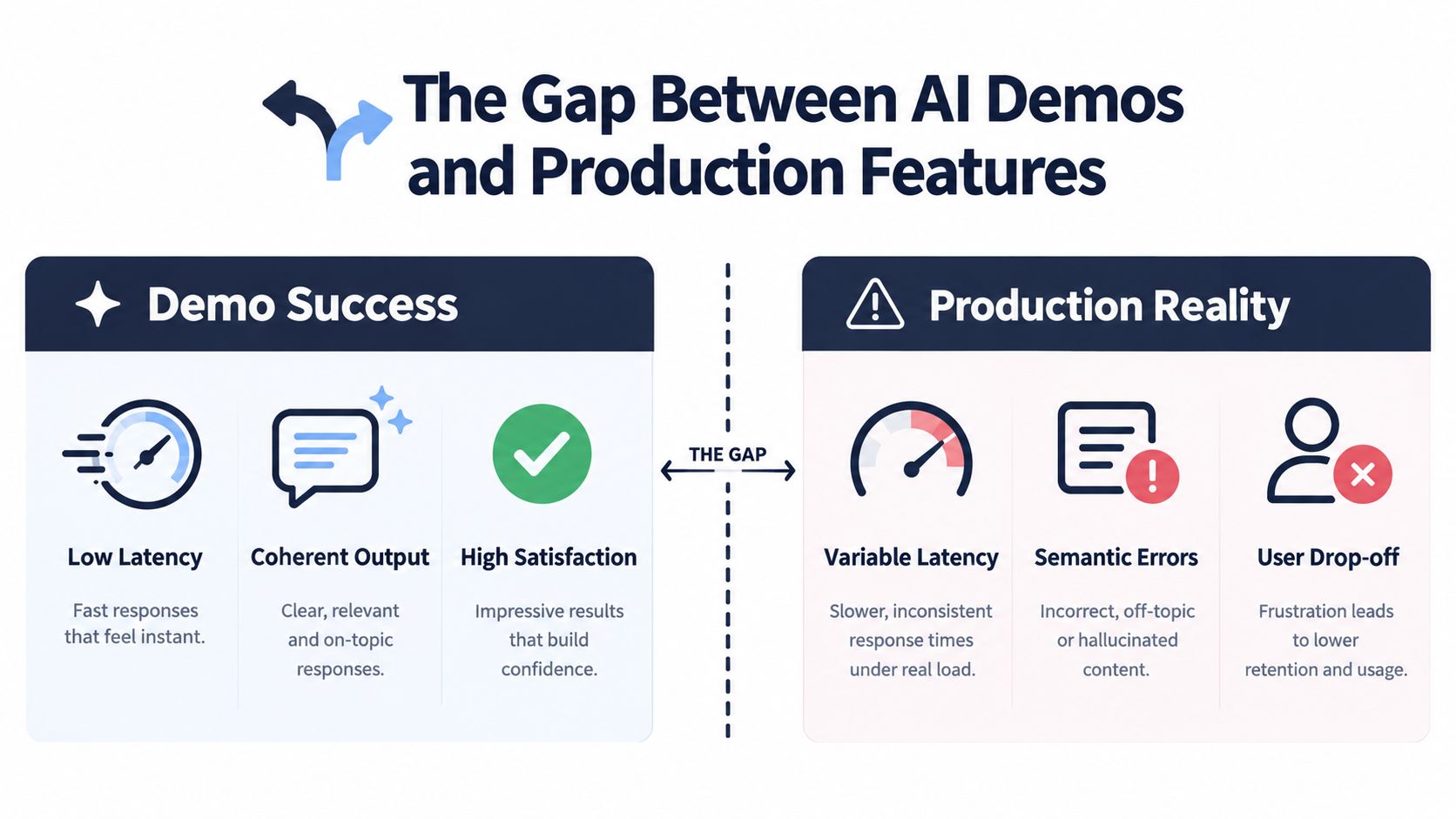
The demo usually looks excellent because it is built to look excellent. A product team wires up a retrieval-augmented assistant, feeds it a clean dataset, keeps the prompt tight, and tests it with friendly examples that all land in the happy path. Executives see low-latency responses, coherent wording, and a polished interface, so the feature gets a green light.
Two months later, the flag is still internal. The reason is rarely that the model “got worse.” It is that the demo never had to face adversarial prompts, unpredictable user intent, slow dependencies, or the cost of running the same feature thousands of times a day.
Why the prototype lies politely
A prototype rewards the person building it. Production rewards the system serving strangers. A feature that feels finished in a screen share can still fail under load, across languages, or when users phrase the same request in ways nobody on the team anticipated.
The shift in the market makes that gap harder to ignore. According to Digital Applied's enterprise adoption dataset (Digital Applied), by Q1 2026, 80% of enterprise applications shipped or updated that quarter embedded at least one AI agent, up from 33% in 2024, and enterprises with at least one agent in production rose from 9% to 31% over the same period. AI features are no longer sitting in labs, they are being inserted into customer-service automation, coding assistants, and workflow tools.
What breaks first in production
Three failure modes show up early. First, latency stretches as retrieval, tool calls, and model calls chain together. Second, cost grows faster than the feature team expected because every user action now consumes tokens and external calls. Third, the feature starts making subtly wrong decisions, which is worse than an obvious error because users trust it.
For teams shipping into production, the work is to define boundaries, measure behavior, and set fallback logic before the feature reaches broad traffic. The system needs to be explainable to SRE and support in terms of inputs, outputs, fallback behavior, and cost per request.
A model can produce a fluent answer and still be the wrong component for the step you are shipping. The useful questions are practical ones, where the model should sit, what should stay deterministic, how the ugly cases get tested, and what happens when the system is wrong but still confidently answering.
Designing an AI Application Around Reliability
Reliability starts before a prompt exists. Write one sentence that states the user outcome, then draw the smallest possible boundary where an AI call improves the experience over a deterministic path. If the answer is already obvious with rules, templates, or simple search, don't add a model just because you can.
Set the boundary before you set the prompt
This decision matters because different parts of the system have different tolerance for failure. A workflow step that only suggests a draft can tolerate more model uncertainty than a step that triggers an outbound action. A summarizer can be loose, a refund engine can't.
That's also where cost ceilings belong. Model choice gets shaped by request budget, latency budget, and the blast radius of an incorrect answer, long before prompt engineering starts. If a small model plus retrieval solves the task well enough, that's usually the better production choice than reaching for a frontier model by default.
Wrap the model in software discipline
Treat the model as an unreliable component inside a reliable shell. That means idempotent calls, explicit input contracts, schema-validated outputs, and confidence thresholds that stop unsafe downstream actions. It also means retries, circuit breakers, and human escalation paths where the model shouldn't be allowed to improvise.
A model can produce a fluent answer and still be the wrong component for the step you're automating.
The system design should make that distinction visible. A support reply generator can hand off to a human when confidence is low. A workflow assistant can refuse to act when the output schema doesn't parse cleanly. A compliance-sensitive flow can convert the model into a classifier or router instead of a free-form generator.
Use architecture to make trust possible
The practical test is simple. If the model fails, does the user experience degrade gracefully, or does the whole request collapse? If the answer is collapse, the architecture is too fragile.
That's why architecture beats prompt cleverness every time. You can rescue a mediocre prompt with strong contracts, but you can't rescue a loose architecture with a brilliant prompt.
Prototyping the Model and Retrieval Layer
A strong prototype is measurable, reproducible, and boring in the right ways. Pick the model tier based on task complexity, not hype, then use retrieval to narrow the problem before asking the model to generate anything. Domain-specific systems usually do better when the model is smaller and the context is cleaner.
Choose the model for the job
For narrow enterprise tasks, the default instinct to use the largest model is often wasteful. A smaller model with well-structured retrieval can be easier to operate, cheaper to run, and more predictable under load. Frontier models still matter for broad reasoning or especially difficult generation tasks, but they shouldn't be the automatic first answer.
Prompt design should be handled like ordinary engineering work. Keep system instructions versioned, prefer structured outputs, and capture the exact prompt alongside the model version and trace data. If the answer only looks good in a live chat window, it isn't ready.
Make retrieval part of the product, not an afterthought
Retrieval quality is usually where the product either becomes grounded or becomes slippery. Chunking strategy, index freshness, and hybrid keyword plus vector search all shape answer quality before the model ever sees a token. If the retrieved context is stale or irrelevant, the model will confidently launder that weakness into user-facing text.
Tool use deserves the same discipline. Function calling should use strict schemas and timeouts, because once the model starts invoking systems, the failure mode isn't just bad language, it's bad action. That's the point where grounding matters more than style.
The multi-LLM stack pattern is useful when the task needs different capability tiers for different steps, and the article at the multi-LLM stack pattern is a practical reference for that kind of composition.
Prototype readiness checklist
- Reproducible prompts: keep the exact inputs, system instructions, and tool settings under version control.
- Pinned model versions: don't evaluate against a moving target.
- Captured traces: store retrieval context, model output, and tool calls together.
- Fixed test set: use cases that resemble production traffic, not just clean examples.
- Measured outputs: define the shape of success before asking whether the prototype “feels good.”
| Model and Retrieval Choices by Task Type | Recommended Model Tier | Retrieval Strategy | Tool or Grounding |
|---|---|---|---|
| Simple classification or routing | Smaller model | Minimal or no retrieval | Deterministic rules or schema checks |
| Domain Q&A | Mid-tier model | Hybrid keyword plus vector search | Strict citation or source grounding |
| Multi-step workflow assistance | Mid-tier or larger model | Fresh indexed context with traceable chunks | Function calling with timeouts |
| High-risk customer actions | Constrained model or classifier | Narrow, policy-filtered retrieval | Human review or hard approval gates |
Prototyping ends when the system can be measured. If you can't compare runs, replay traces, and explain why the output changed, you don't have a prototype yet, you have a convincing screenshot.
Building Evaluation Pipelines That Catch Real Failures
Accuracy alone hides too much. A feature can answer correctly and still be too slow, too expensive, too brittle under partial outages, or too risky to release. Production evaluation needs to look at correctness, latency, cost, safety, and reliability together, because the user experiences all of them at once.
Build evaluation from real traffic
The best offline test sets come from real request traces, not imagined examples. Capture representative prompts, the retrieval context the system saw, and the downstream actions the feature attempted. Then label those cases with domain experts who understand the workflow, not generic annotators who only see text.
That dataset needs version control just like code. When prompts, retrieval settings, or model versions change, the evaluation set should stay stable so regressions are visible. If the benchmark changes every time the product changes, nothing useful gets learned.
Measure the failure you actually care about
The useful metrics depend on the product, but the categories are stable. Track answer correctness where it matters, token spend where finance cares, refusal behavior where safety matters, and end-to-end latency where users feel pain. For retrieval-augmented systems, citation precision matters more than generic fluency.
One benchmark in the provided research argues that many agentic evaluations overweight task completion and ignore cost-efficiency and real-world reliability, and it reports up to 50x cost variation for similar precision plus reliability falling from 60% in a single run to 25% across eight-run consistency checks (benchmark paper). That's exactly the kind of gap that turns a nice demo into an expensive production mistake.
Practical rule: if you only track one quality metric, you'll miss the first production incident that actually matters.
| Evaluation Dimensions and Practical Metrics | Example Metrics | Failure Signal |
|---|---|---|
| Correctness | Task success rate, citation precision | Confident but wrong answers |
| Latency | P95 response time, tool-call wait time | Users abandon the flow |
| Cost | Token spend per request, cache hit rate | Feature becomes financially hard to defend |
| Safety | Refusal rate, policy violation rate | Harmful or disallowed outputs slip through |
| Reliability | Retry success, outage behavior | A small dependency failure collapses the request |
Close the loop with live validation
Online evaluation should mirror release risk. Shadow mode lets you compare outputs without exposing users to the new path. A/B testing on holdout cohorts shows how the feature behaves in real traffic. LLM-as-judge can help if the rubric is calibrated, but it should never replace domain review on important flows.
When a case fails, the fix should be obvious from the pipeline. If the output is wrong because retrieval missed the right document, fix the index. If the system is too slow, shrink the prompt or route to a lighter model. If the issue is policy behavior, tighten the guardrail and retest the adversarial set. Evaluation only matters when it points to a specific remediation.
Deploying AI Features With Guardrails and Fallbacks
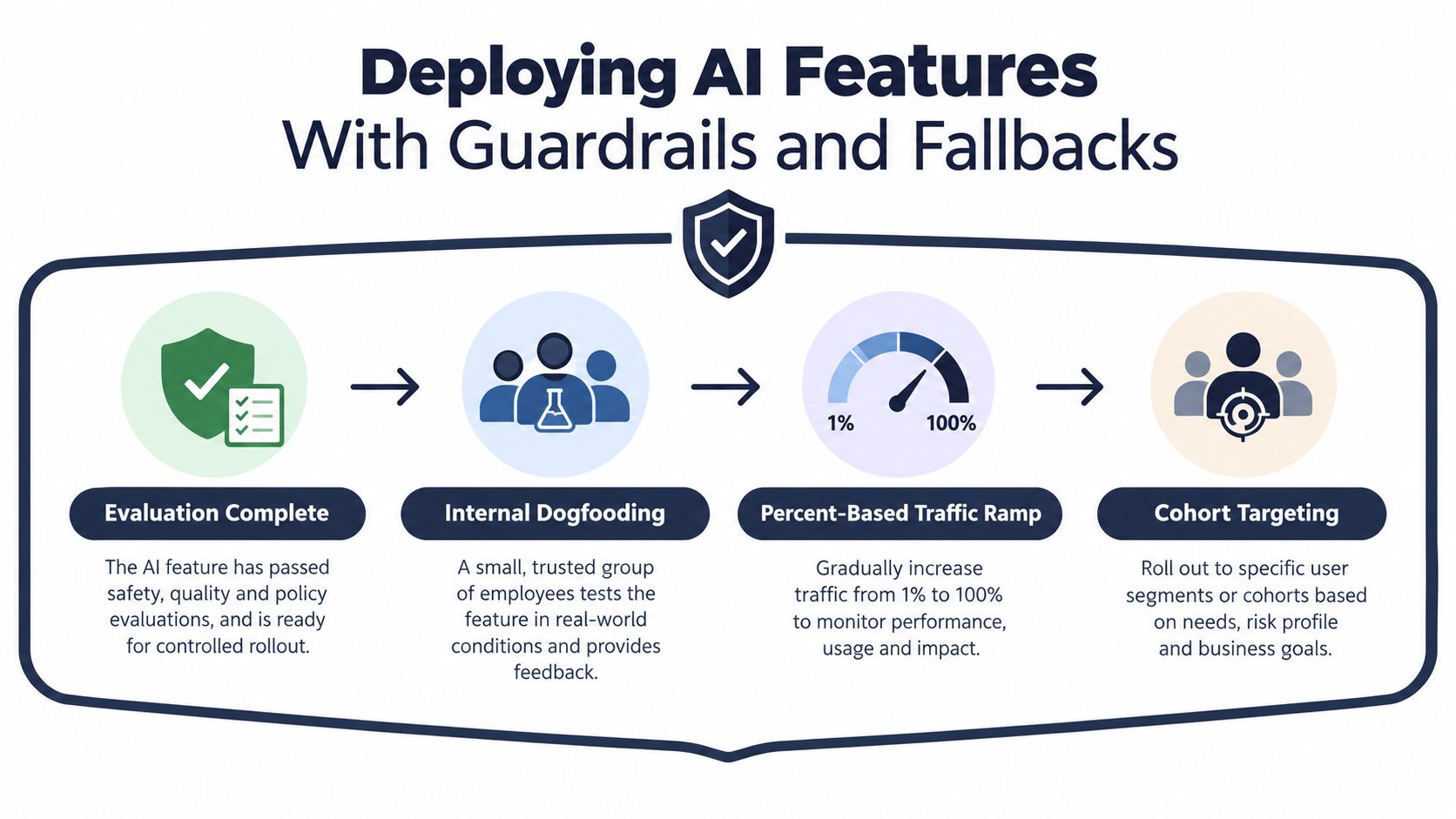
A green evaluation report is not a release. Production deployment needs to be staged, observable, and reversible so one bad change does not turn into a long incident. Internal dogfooding, small traffic ramps, and cohort targeting give teams room to validate behavior before the feature touches the full customer base.
Put guardrails on both sides of the model
Input classification should catch prompt injection and obvious policy violations before the request reaches the model. Output validators should enforce schema, length, and tone constraints before the response reaches the user or downstream systems. Circuit breakers belong around the whole path, because a failing provider or degraded index is still a failure even if the model is healthy.
Fallbacks matter just as much. Cached responses can keep a feature usable during short outages. A smaller model tier can preserve basic functionality when the primary model is expensive or slow. Deterministic rules should handle cases where the AI path adds uncertainty without enough upside.
Make cost control part of rollout
Cost control is not a finance afterthought. It is a deployment constraint that belongs in the rollout plan itself. Token budgets per request, per-user caps, and routing low-stakes queries to cheaper models help keep the feature inside a defendable operating range, especially once it moves from experiment to customer traffic.
Roll out with traceability
Every deploy should leave a trail that connects user impact to the exact change. That is what makes rollback, postmortem work, and future tuning possible. If a feature ships without clear traces, the team cannot tell whether the issue came from the prompt, the index, the provider, or the deployment itself.
Monitoring AI Applications Under Real Traffic
Traditional observability tells you when a request failed. AI observability has to tell you when a response was technically successful but semantically wrong. That's a different problem, and it needs structured logs, meaningful traces, and human review that can see beyond binary error codes.
Log the whole semantic path
A useful telemetry stack captures the prompt, retrieved context, model output, and user feedback in one place. Metrics should track token spend, cache hit rate, retrieval recall, and the distribution of refusals. Traces need to follow the request across retrieval, model calls, and downstream tools so the failure path can be reconstructed later.
That matters because the bugs are often subtle. A response can look coherent while being grounded in stale context, or a tool call can succeed while the answer to the user is misleading. If the telemetry only records the final response, the team is flying blind.
Watch for drift, not just outages
Concept drift shows up when incoming queries stop resembling the baseline evaluation set. Comparing embedding distributions is one practical way to see that shift before it turns into a product issue. Quality drift also shows up in sampled human review, thumbs-down signals, and task completion patterns that slowly move in the wrong direction.
The guardrail context itself can drift too. A separate evaluation in the provided research found that inserting benign documents into guardrail context changed input-guardrail judgments in about 11% of cases and output-guardrail judgments in about 8% of cases, which is a useful reminder that context changes can alter behavior in retrieval-augmented systems (OpenReview evaluation).
The fastest way to miss an AI incident is to assume the model is the only thing that can change.
Build incident playbooks around AI-specific failures
A hallucination spike needs a different response from a provider outage. Retrieval index staleness needs a different fix from a tool timeout. The on-call playbook should say who checks traces, who can roll back the index, and which feature flags can disable the risky path without taking the whole service down.
The most valuable feedback loop sends production traces back into the evaluation set. That turns real user behavior into future test cases and keeps the system honest as the product evolves.
Habits That Keep AI Features Alive in Production
The teams that keep AI features alive don't rely on heroics. They build habits that make the system easier to reason about after launch, not just easier to demo before it. Prompts, retrieval indexes, and evaluation suites become living assets, which means they need owners, versioning, and review discipline.
Treat the operating pieces like code
Prompts and indexes should have code owners. Weekly review meetings should include product, ML, and SRE voices in the same room, because each group sees a different kind of failure. Evaluation suites should be treated as documentation that evolves with the feature, not as a one-time audit artifact.
The same discipline helps teams avoid oversized change sets. Thinking in smaller commits maps well to AI work, because smaller changes make it easier to see whether a prompt edit, a retrieval tweak, or a fallback change improved the system.
Prepare for the specific ways AI fails
Incident playbooks should name the failures that show up most often, prompt injection, hallucination spikes, upstream model deprecations, and retrieval drift. Those aren't abstract risks, they're the operational cost of putting a probabilistic system into a product surface that users trust.
Teams that stay healthy also cap feature scope behind kill switches and instrument cost per request from day one. When a feature gets popular, its economics change fast, and the team needs a way to pause or narrow the blast radius without a scramble. Deterministic components should remain the default wherever the model doesn't add real value.
Operational habit: if a simple rule works, ship the rule. Use AI where judgment, language, or ambiguity actually matter.
The broader pattern is simple. Reliability design keeps the feature safe, evaluation tells you whether it works, monitoring shows how it behaves under traffic, and operating habits keep the whole thing maintainable. AI isn't a one-time implementation, it's a system you keep governing after launch.